COI Tracking Spreadsheet: Excel and Google Sheets Guide
Spreadsheets are where most COI tracking starts -- and where it eventually breaks. Learn how to set up a spreadsheet that works, what it costs you, and exactly when to upgrade.
Every COI tracking journey starts the same way: someone opens Excel or Google Sheets, creates a few columns -- vendor name, policy type, expiration date -- and starts filling in rows. It works fine for the first 20 vendors. By vendor 50, you are spending Friday afternoons chasing expirations. By vendor 150, someone has already missed a renewal and nobody knows about it yet.
Spreadsheets are the universal starting point for certificate of insurance tracking because they are free, familiar, and flexible. They are also the universal breaking point -- the moment when manual processes, human error, and scale collide. This guide is not here to tell you spreadsheets are bad. It is here to tell you exactly where they work, where they fail, what they really cost, and how to build one that buys you time before you upgrade.
By the end of this guide, you will know whether your spreadsheet can carry you another year, or whether the math says it is time to switch to COI tracking software -- and exactly how to make that transition with zero data loss.
When Spreadsheet COI Tracking Works
Let us be honest about where spreadsheets succeed. There is a narrow band of scenarios where a spreadsheet is the right tool -- and if you are inside that band, this section will tell you how to stay there for as long as possible.
Low Vendor Count (Under 30)
If you manage fewer than 30 vendors with active certificates, a spreadsheet is still a viable tool. At this scale, you can review every row in under 5 minutes. Expiration dates are easy to scan. Manual data entry takes maybe 2-3 hours per month. The operational overhead is low enough that switching to software may not yet justify the cost -- though it will eventually.
Simple Requirement Profiles
Spreadsheets work best when every vendor has the same insurance requirements: same coverage types, same minimum limits, same additional insured requirement. If you are tracking general liability only, with a standard $1M/$2M requirement across all vendors, a spreadsheet handles this elegantly. The complexity that breaks spreadsheets is variation -- different limits per vendor type, specialized coverages, lease-specific endorsements. When requirements are uniform, the spreadsheet model holds.
Single Decision-Maker
A spreadsheet on one person's desktop is a functional system. A spreadsheet shared across a team of five people is a data integrity nightmare. If you are the sole person responsible for COI tracking -- uploading certificates, entering data, following up on expirations -- a spreadsheet works because there is one source of truth and one person maintaining it. The moment you add a second person, you introduce conflicting edits, overwritten cells, and version confusion.
No Audit Requirements
If your compliance program faces no external scrutiny -- no lender audits, no carrier audits, no regulatory filings -- a spreadsheet is adequate. It stores data. It can be filtered and sorted. But if you are asked to produce a compliance report for an auditor, a spreadsheet offers no audit trail. You cannot prove who changed what, when, or why. For organizations with audit obligations, spreadsheets create a documentation gap that software fills with timestamped logs.
Where Spreadsheet COI Tracking Breaks
The breakpoints are predictable. They follow the same pattern across every organization that outgrows its spreadsheet: scale, complexity, and accountability converge to create a system that costs more than it saves.
Vendor Count Exceeds 50
At 50+ vendors, the spreadsheet becomes a part-time job. Each vendor has a certificate that expires annually. That means roughly one expiration per week, on average. But renewals do not arrive on schedule. Certificates come in as PDFs that must be manually reviewed, key data extracted, and entered into the spreadsheet. A vendor with 3 policy types (general liability, workers' comp, auto) creates 3 rows, 3 expiration dates, and 3 follow-up workflows. At 50 vendors with an average of 2.5 policies each, you are tracking 125 expiration dates. A spreadsheet gives you no help prioritizing which ones are urgent.
Requirement Variation Increases
When different vendor types need different coverage limits -- roofers need $5M umbrella, landscapers need $1M general liability, electricians need pollution liability -- the spreadsheet becomes a matching exercise. Every new certificate must be manually compared against a requirement checklist stored somewhere else (another tab, a separate document, or someone's memory). This cross-referencing takes 3-5 minutes per certificate, scales linearly with vendor count, and is the source of most compliance gaps in spreadsheet-based systems.
Multiple Properties or Locations
Vendors work across properties. A plumber services Building A, Building B, and Building C. In a spreadsheet, you either duplicate the vendor across three tabs (creating update synchronization problems) or add a property column to a master sheet (creating filtering complexity). Neither approach gives you a clean answer to "which vendors at Building B are non-compliant?" without manual filtering and cross-checking each time the question is asked.
Team Accountability Becomes Necessary
The moment someone besides you needs to see compliance status -- a property manager, a regional director, a risk officer -- the spreadsheet fails as a communication tool. You cannot give a VP access to your personal spreadsheet without risking accidental edits. You cannot send a compliance summary email without manually compiling a report. The spreadsheet is your tool, not the organization's tool, and that distinction becomes a liability when accountability spreads beyond your desk.
The Hidden Costs of Spreadsheet COI Tracking
Spreadsheets feel free because there is no subscription fee. But the labor, risk, and opportunity costs are real -- and they are often higher than the price of software. Here is the math.
Labor Cost: The 10-Hour Weekly Tax
A property management compliance specialist tracking 100 vendors in spreadsheets reports spending 10 hours per week on COI administration: opening certificate PDFs, manually entering policy numbers and dates into Excel, cross-referencing against requirement checklists, sending follow-up emails for expired or non-compliant certificates, and updating status columns. At a loaded labor rate of $35/hour, that is $350 per week, $1,400 per month, and $16,800 per year -- spent on data entry that software automates in seconds.
Error Cost: The $3.50 Per Certificate Problem
Manual data entry has an error rate of approximately 1% per field -- meaning roughly one mistake per 100 keystrokes. A single COI might have 15-20 fields entered into a spreadsheet: policy number, carrier name, effective date, expiration date, each coverage limit, additional insured status, and so on. At 1% error per field, roughly 15-20% of spreadsheet entries contain at least one error. For 100 vendors, that is 15-20 certificates with wrong dates, wrong limits, or wrong carrier names. Each error creates a compliance gap that could result in an uncovered claim. The cost of one uncovered claim -- even a modest one -- dwarfs years of software subscription fees.
Opportunity Cost: What You Are Not Doing
Those 10 hours per week spent on spreadsheet COI tracking are 10 hours not spent on higher-value work: negotiating better insurance requirements with vendors, training property staff on risk management, conducting site safety inspections, or analyzing claims trends. The spreadsheet consumes time at the lowest-value activity -- data entry -- while higher-value risk management goes undone.
How to Set Up a COI Tracking Spreadsheet
If you have decided a spreadsheet is the right tool for your current scale, here is how to build one that maximizes what spreadsheets do well and minimizes their weaknesses. This template works in both Excel and Google Sheets -- Google Sheets is preferred for its real-time sharing and version history.
Essential Columns
Your COI tracking spreadsheet needs these 12 columns as a minimum:
- Vendor Name -- Legal business name as it appears on the certificate
- Vendor Type -- Category (roofer, electrician, landscaper, etc.) for filtering and requirement matching
- Policy Type -- General liability, workers' comp, auto, umbrella, excess liability, pollution, professional
- Insurance Carrier -- Name of the insurance company issuing the policy
- Policy Number -- Full policy number as it appears on the certificate
- Effective Date -- Policy start date (use proper date format, not text)
- Expiration Date -- Policy end date (this is the column you sort by weekly)
- Coverage Limits -- Dollar amounts for each coverage (e.g., "$1,000,000 per occurrence / $2,000,000 aggregate")
- Additional Insured -- Yes/No -- is your organization named as additional insured?
- Certificate On File -- Yes/No -- or link to the stored PDF
- Status -- Compliant, Expiring Soon (within 30 days), Non-Compliant, Expired
- Notes / Last Contact Date -- Free text for follow-up tracking
Conditional Formatting Rules
Set up these three conditional formatting rules in Google Sheets to make expiration risk visible at a glance:
- Red fill for the Status column when value equals "Expired" or "Non-Compliant"
- Yellow fill for the Status column when value equals "Expiring Soon"
- Red fill for the Expiration Date column when the date is before today's date and Status is not "Renewed"
Google Sheets formula for the Status column (combine with conditional formatting):
=IF(ExpirationDateCell<TODAY(),"Expired",IF(ExpirationDateCell<TODAY()+30,"Expiring Soon","Compliant"))
Weekly Workflow
A spreadsheet COI tracking system only works with a disciplined weekly process. Block 2-3 hours every Friday morning for this checklist:
- Sort by expiration date. Identify every certificate expiring in the next 30 days. These are your priority follow-ups.
- Send renewal requests. Email each vendor with an expiring certificate. Attach a blank ACORD 25 form and your insurance requirements document.
- Process new certificates. Open every certificate PDF received this week. Extract the 12 data points above and enter them into the spreadsheet. Mark "Certificate On File" as Yes.
- Update statuses. Change "Expiring Soon" to "Compliant" for any certificate that has been renewed. Change "Expiring Soon" to "Expired" for any that passed the expiration date without renewal.
- Review non-compliant entries. For any certificate marked "Non-Compliant," check whether the vendor has provided an updated COI. If not, send a second follow-up.
- Take a snapshot. Once a month, save a dated copy of the spreadsheet. This is your compliance record for that month -- the closest thing you will get to an audit trail.
Price Comparison: Spreadsheet vs. COI Tracking Software
| Cost Factor | Spreadsheet (Excel / Google Sheets) | COI Tracking Software (e.g., COI File) |
|---|---|---|
| Software cost | $0/month (Google Sheets) or $6.99/month (Microsoft 365) | 7-day free trial on all plans ($39/mo Base plan) |
| Labor cost (100 vendors) | 10 hours/week x $35/hr = $16,800/year | 2-3 hours/week x $35/hr = $3,640-$5,460/year |
| Error risk | 15-20% of entries contain at least one error | AI extraction with human review; error rate under 2% |
| Expiration alerts | Manual (must remember to check) | Automated 30/14/7-day email alerts |
| Requirement matching | Manual cross-reference against separate checklist | Automatic flagging of non-compliant coverage limits |
| Audit trail | None (monthly snapshots only) | Current vendor roster and review workflow; confirm formal audit-log needs separately |
| Compliance reporting | Manual compilation (30+ minutes per report) | CSV roster export |
| Annual true cost (100 vendors) | $16,800 + uncovered claim risk | $348-$5,460 (subscription + reduced labor) |
The math is unambiguous: at 100 vendors, spreadsheet COI tracking costs roughly 3-5x more than software when you account for labor. And that is before factoring in the cost of a single uncovered claim, which can range from $10,000 for minor property damage to $500,000+ for a serious injury liability case.
When to Switch from Spreadsheets to Software
You do not need to wait until your spreadsheet breaks to switch. In fact, switching before it breaks makes the migration smoother because your data is still clean. Here are the five triggers that mean it is time to move on:
Trigger 1: You Hit 50 Vendors
Fifty vendors is the inflection point where manual tracking costs more than software. At this scale, you are spending 5-7 hours per week on COI administration. A $89/month Growth subscription supports up to 50 vendors and can save several hours per week, depending on your workflow.
Trigger 2: You Missed an Expiration
The first missed expiration is a warning. The second is a pattern. Every missed expiration means a vendor worked on your property without verified insurance -- a liability gap that could have resulted in an uncovered claim. If you have missed even one expiration in the past 6 months, your spreadsheet system has already failed its most important job. Do not wait for the claim that proves it.
Trigger 3: Someone Else Needs Access
When a colleague, manager, or auditor asks to see compliance status and you cannot give them a live, accurate view, the spreadsheet has become a bottleneck. Software provides role-based access so stakeholders can see compliance dashboards without touching your data.
Trigger 4: You Dread COI Tracking
If Friday afternoon COI review is the worst part of your week -- the task you procrastinate, the one that makes you consider changing jobs -- the spreadsheet is costing you more than money. It is costing you morale, focus, and the energy you could be spending on work that matters. Software does not make COI tracking fun, but it removes the dread by automating the parts that create the most friction.
Trigger 5: An Audit Is Coming
If you have a lender audit, carrier audit, or regulatory review on the horizon, switch before the audit starts. Migrating your spreadsheet data to software takes hours. Preparing a manual compliance report from a spreadsheet for an auditor takes days -- and the auditor will find gaps your spreadsheet hid. Software produces an instant, auditable compliance report that reflects live data, not last month's snapshot.
How COI File Compares
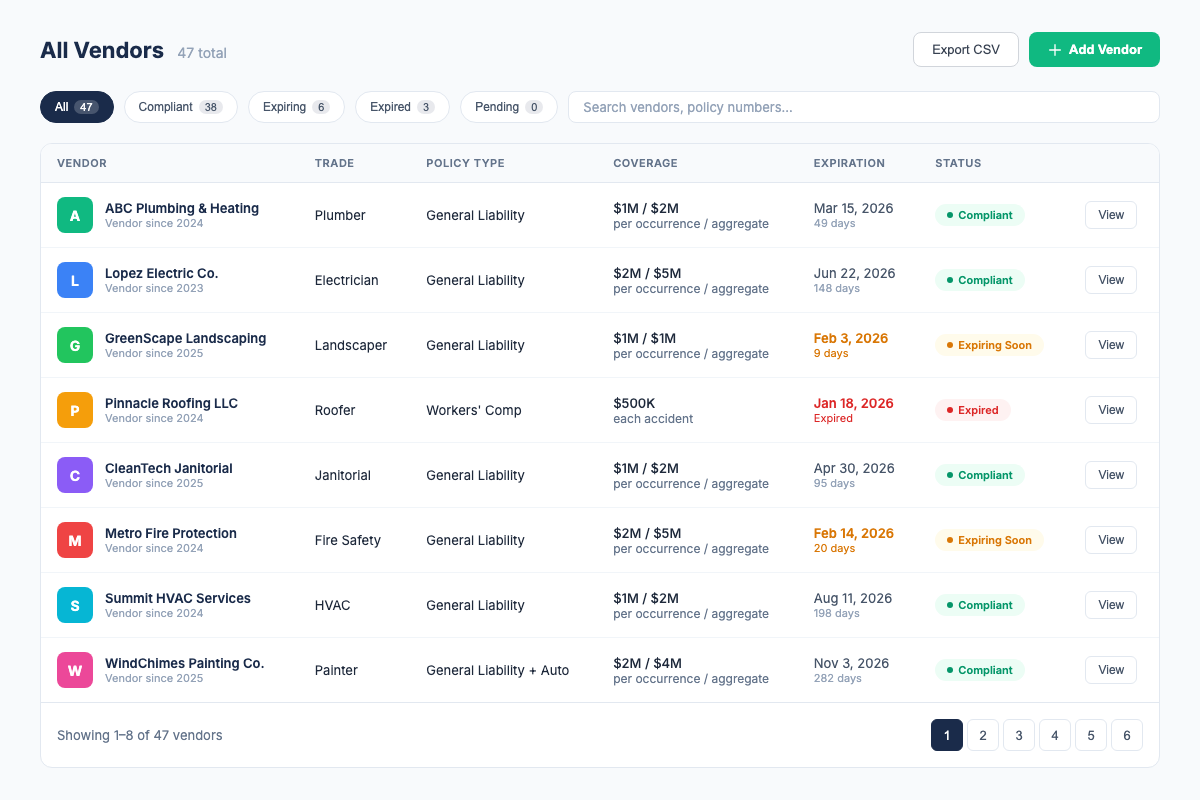
COI File was built by a compliance specialist who spent 6 years tracking 2,000+ certificates in spreadsheets -- and knows exactly where and why the spreadsheet model fails. Here is how the transition works:
- Export your spreadsheet as CSV. Open your Excel or Google Sheets file. File > Download > CSV. This takes 30 seconds.
- Import into COI File. Our bulk CSV importer maps your columns to our fields. You tell it which column is "Vendor Name," which is "Expiration Date," and so on. COI File validates every row and flags any data that needs cleanup before import. For a spreadsheet with 200 vendors, the import takes under 10 minutes.
- Upload your certificate PDFs. Send vendors a secure upload link for an ACORD 25 PDF. AI-assisted extraction surfaces policy types, coverage limits, dates, and relevant wording for you to review and confirm.
- Set up property requirements. Define the holder and additional-insured wording needed for each property, then review certificates against those requirements before approving the vendor record.
- Enable automatic alerts. COI File sends email alerts at 30, 14, and 7 days before any certificate expires -- to you and optionally to the vendor. You stop checking spreadsheets. Alerts come to you.
- Export the roster when needed. Use the CSV export for handoffs, reporting workflows, or offline analysis outside the app.
The entire transition -- from opening your spreadsheet to having a live compliance dashboard -- takes under 2 hours for up to 500 vendors. And once the data is in COI File, you never manually type a certificate into a spreadsheet again.
COI File includes a 7-day free trial on all plans, cancel anytime. Base starts at $39/month for 10 vendors. Start free today.
Frequently Asked Questions
Industry Sources
- IRMI (International Risk Management Institute) -- Certificate of insurance best practices, ACORD form guidelines, and risk transfer standards. irmi.com
- ACORD -- The standards body behind ACORD 25 and other insurance forms used in certificate tracking. acord.org
- The National Alliance for Insurance Education and Research -- Risk management and insurance compliance training resources. thenationalalliance.com
Related Resources
- COI Tracking: The Complete Guide -- the full pillar page covering all aspects of COI tracking
- Best COI Tracking Software -- compare features, pricing, and which tool fits your needs
- COI Compliance Rate Guide -- how to measure and improve vendor insurance compliance
- COI Tracking for Property Managers -- how PMs manage vendor compliance across multiple properties
- COI File Features -- see everything our platform does
- COI File Pricing -- transparent pricing, 7-day free trial on all plans
Firdaosh Bano
COI Compliance Specialist
Firdaosh Bano is a COI compliance specialist and the founder of COI File. She spent 6 years managing vendor compliance for commercial properties - tracking 2,000+ COIs across 150+ properties in spreadsheets before building the tool she wished she'd had. She writes about certificate of insurance compliance, vendor risk management, and making insurance tracking less painful for small teams.